Phone remote and sender

Available for Android

CrackMac Companion™

The CrackMac phone app: a remote for CrackTV, Send to TV, your home, your cameras and every CrackMac app in one place.

Version0.7.1Runs onAndroid 8.0+ phonesPriceFree
Android phone previewAndroid 8.0+ phones
Companion interface
CompanionAvailable for Android

What it is

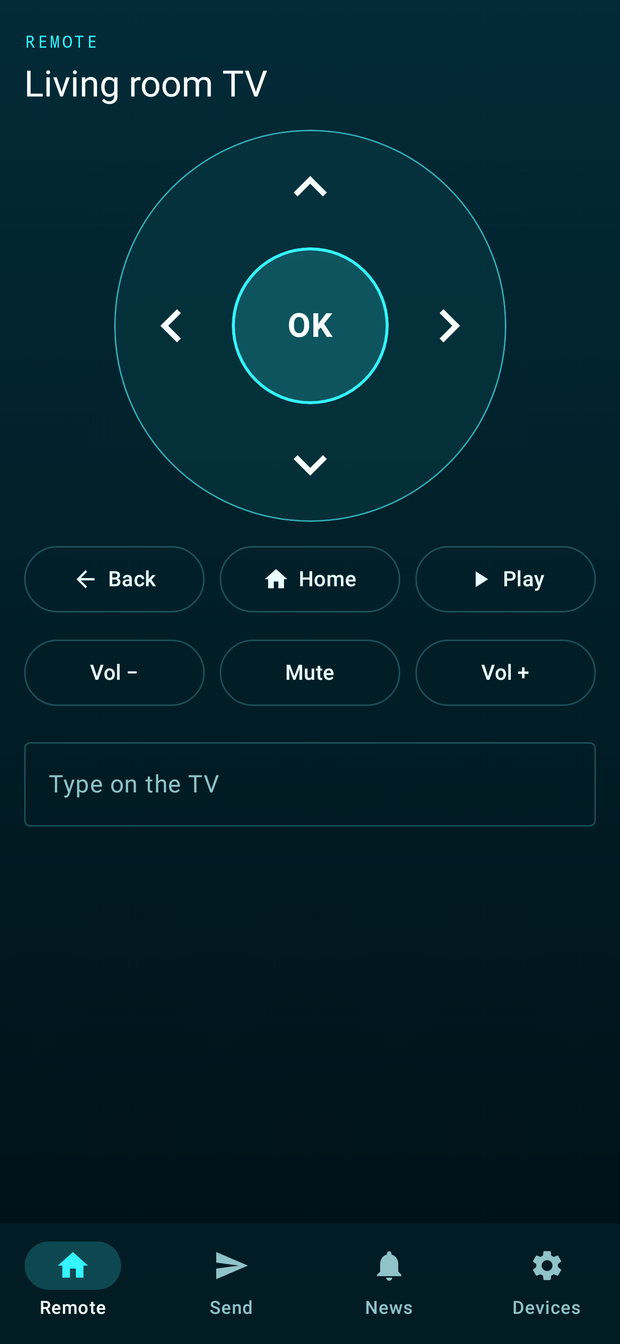
Companion turns your Android phone into a CrackTV remote, lets you type into TV search boxes with your phone keyboard, and sends links, photos, videos and apps to the TV from any app's Share menu.

It pairs over your home Wi-Fi with CrackLink; nothing goes through the internet.

What it does

Everything Companion can do.

19 features as of version 0.7.1, grouped by what you want to do. What changed lately →

Your TV

  • Phone remoteArrows, OK, Back, Home, play/pause and volume for CrackTV.Since 0.1.0
  • Type on your phoneYour phone keyboard types into the TV's search boxes.Since 0.1.0
  • Send to TVFrom any app's Share menu: links, photos, videos and apps.Since 0.1.0

Your home

  • Home tabLights, plugs, fans, heating, speakers and scenes through your CrackHome panel.Since 0.3.0
  • Some things stay on the wallLocks, the alarm and covers are never controlled from the phone; cameras can only be viewed, through CrackWatch.Since 0.3.0
  • Device healthSee your TV's and panel's memory and Wi-Fi; run Boost or a speed test on the TV.Since 0.4.0
  • PC healthYour PC's memory and Wi-Fi next to the TV and panel.Since 0.7.0

Your cameras

  • Cameras tabYour CrackWatch cameras with a still of each; tap one to watch it live.Since 0.5.0
  • Quick switcherJump between cameras without leaving the live view.Since 0.5.0
  • Motion alertsCrackWatch's alerts, newest first, with their photos.Since 0.5.0
  • View onlyThe phone cannot change anything, and camera passwords stay on the PC.Since 0.5.0

Your apps

  • InboxCamera alerts, new devices, downloads and updates from your PC, at the top of Apps.Since 0.7.0
  • Apps tabEvery CrackMac app in one place: on this phone, on your TV and on your PC.Since 0.6.0
  • Install and updateCrackNote and the Companion install and update here, checked before Android installs them.Since 0.6.0
  • Install on my TVCrackTV goes from your account to your paired TV, which asks before installing.Since 0.6.0
  • One update badgeShows how many CrackMac apps have an update waiting.Since 0.6.0

Staying in touch

  • CrackMac newsThe latest releases under Apps, saved for offline reading.Since 0.1.0
  • Updates inside the appOnce linked to your CrackMac account, checked before they install.Since 0.2.0
  • Private pairingA six-digit code over your home Wi-Fi, encrypted, with no internet needed.Since 0.1.0

Patch notes

What changed lately.

The latest releases of Companion. Every release →

0.7.1New address: crackmac.net1 Changed
  • Changed

    Your account, the Apps tab, updates and news now use crackmac.net.

    CrackMac moved to crackmac.net. The old address, crackmac.nl, was blocked by its registrar. Install this version once from your library at account.crackmac.net.
0.7.0Inbox2 New
  • New

    Inbox at the top of Apps: camera alerts, new devices, finished downloads and updates from your PC.

    Pair with your PC under Devices once the Launcher's phone link is on (Launcher 1.20 or newer).
  • New

    Devices shows your PC's health next to your TV and panel.

0.6.0Every app in one place4 New1 Improved1 Changed
  • New

    Apps tab: every CrackMac app in one place, from the product list on crackmac.net.

    Phone apps get Install, Update or Open; PC apps link to their page; new CrackMac apps appear by themselves.
  • New

    Install and update CrackNote (and the Companion) right here, through your CrackMac account.

    Each download is checked for its size and fingerprint, that it is the right app and version, and, when it replaces an app, that it is newer and signed by the same key. Then Android asks you to confirm.
  • New

    Install on my TV: CrackTV is downloaded and checked on the phone, then sent to your paired TV, which asks before it installs.

  • New

    Apps you have not added to your CrackMac library yet get an "Add to my library" button (free).

  • Improved

    One badge on Apps counts waiting updates, checked quietly at most twice a day.

  • Changed

    CrackMac news moved to the bottom of the Apps tab, which takes the News tab's place.

Before you start

What you need.

An Android phone with Android 8.0 or newer
CrackTV 0.15.0 or newer on the same Wi-Fi
For arrows and typing: turn on the phone remote in CrackTV, Settings › Devices
For Home: a CrackHome wall panel with version 2.4.0 or newer on the same Wi-Fi
For Cameras: CrackWatch 0.4.0 or newer on a PC on the same Wi-Fi, with phone viewing paired
A free CrackMac account to download it
Updates Install once from your library at account.crackmac.net on your phone. Then link the app to your account under Devices, and new versions arrive inside the app.

Available now

Version 0.7.1

Free with a CrackMac account. On the Android device you want it on, open your library at account.crackmac.net, choose Download for Android, then open the file to install.