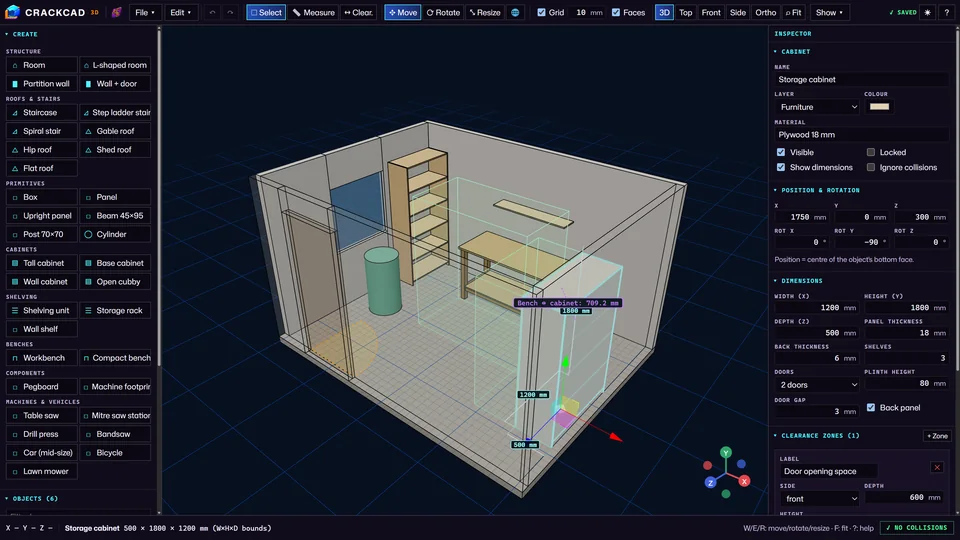
Build the space.
Set room dimensions, draw irregular outlines, add doors and windows, then explore partitions, stairs and roofs.


Plan a workshop. Fit out a room. Design the furniture that goes inside it. Build with editable dimensions in millimetres, then check the fit in 3D.
No installation or account. Your projects stay in this browser.
Change a dimension and the model follows. Keep the room, its contents and the measurements together as your idea develops.
Set room dimensions, draw irregular outlines, add doors and windows, then explore partitions, stairs and roofs.
Add cabinets, shelves and workbenches. Edit their sizes, move and rotate them, and measure the gaps between objects.
Collision warnings show where real geometry overlaps. Check door swings, low ceilings and awkward clearances before building.
Export a portable project, dimensioned PDF drawings, a cut list, or a GLB 3D model. Import STL, OBJ and glTF models into your scene.

Switch between 3D, top, front and side views. Use snapping, editable measurements and dimension annotations to place things precisely.
Start with the sample workshop or choose a room, shed or blank project. Every object remains editable.
Start a design ↗CrackCAD autosaves projects on this device. There is no cloud account or automatic sync between devices.
Export your project as a .crackcad.json file for backup or to move it elsewhere. Clearing browser data, using a private window, or switching browsers can leave your saved projects behind.
This is a browser preview. Check exported dimensions and construction details before using a design for a real build.
The latest releases of CrackCAD 3D. Every release →
CrackCAD 3D gets a first coat of the new CrackMac look: deep violet panels, the new CrackCAD logo and a blueprint-blue grid.
It is still a preview, so the full overhaul comes later. Your projects in this browser are untouched.Open the full 3D CAD workspace directly from its own product page on crackmac.net.
Design rooms, workshops and furniture with editable millimetre dimensions, collision checks, drawings and cut lists.
Projects save locally in this browser. Export a .crackcad.json file for backups or moving to another device.
Best with a modern browser and WebGL. Touch controls are available on phones and tablets.